

During a recent mobile security assessment, we encountered an Android application that appeared straightforward at first glance but quickly evolved into a layered challenge involving Java-based detection, native checks, and Flutter-driven enforcement. The initial objective was simple: run the application on a rooted device for dynamic testing. However, the app consistently terminated on launch, indicating the presence of root detection mechanisms. What made this case interesting was not just the presence of detection, but how deeply it was integrated across multiple layers of the application stack.
Initial Recon & Static Analysis
We began by decompiling the APK using JADX. Inside the package structure, we identified the use of the well-known third-party library RootBeer, a common choice for implementing root detection in Android apps. The key function of interest was:
public boolean isRooted() {
    return detectRootManagementApps() ||
           detectPotentiallyDangerousApps() ||
           checkForBinary("su") ||
           checkForDangerousProps() ||
           checkForRWPaths() ||
           detectTestKeys() ||
           checkSuExists() ||
           checkForRootNative() ||
           checkForMagiskBinary();
}
This function aggregates multiple checks:
- Detection of known root management apps (Magisk, SuperSU, etc.)
- Presence of binaries like
suandbusybox - System properties (
ro.debuggable,ro.secure) - Writable system paths
- Native root checks via
RootBeerNative
From a reverse engineering standpoint, this was expected and relatively easy to bypass.
First Attempt: Smali Patching
We moved to static patching using apktool. The idea was to modify the isRooted() method in smali code to always return false, effectively disabling RootBeer detection.
Original smali (simplified logic):
invoke-virtual {p0}, Lcom/scottyab/rootbeer/RootBeer;->detectRootManagementApps()Z
...
if-eqz v0, :cond_x
...
return v1  # true
Patched version:
.method public isRooted()Z
    .locals 1
    const/4 v0, 0x0
    return v0
.end method
Problem: App Still Exits
Despite completely neutralizing RootBeer, the app continued to exit immediately.
This was the first major clue:
Root detection was not limited to RootBeer
Deeper Analysis: Native Layer
Further inspection through the smali revealed a custom native library:
System.loadLibrary("rjsniffer-lib");This indicated:
- Additional root detection logic implemented in native code (JNI)
- Likely checks for Magisk mounts, binaries, or environment anomalies
Why this is important:
- This is not part of RootBeer
- It’s a custom developer-implemented native library
- Loaded very early via:
AppZygotePreload → doPreload()What that tells us:
- The app is using Zygote preload → advanced technique
- Native library is initialized before app logic
- Likely used for:
- Root detection
- Environment validation
- Anti-tampering
Additional Clue You Found
From Sniffer.smali:
const-string v2, "magisk"and:
blackListedMountPaths = ["magisk", "core/mirror", "core/img"]👉 This strongly indicates:
- Native layer is checking Magisk mounts
- This is not covered by RootBeer alone
The presence of rjsniffer-lib combined with Magisk-related strings confirmed that the application implements a custom native root detection layer, likely designed to detect modern rooting frameworks beyond standard Java-based checks.
Identifying the Underlying Flutter Security Plugin
At this stage, multiple indicators suggested that the application was not relying solely on RootBeer or a completely custom implementation, but rather leveraging a pre-built Flutter security plugin.
The first key clue was the native library:
System.loadLibrary("rjsniffer-lib");This naming pattern stood out, as it does not belong to the RootBeer library. Further analysis of the package structure revealed:
com.emrys.rjsniffer.rjsnifferThis plugin is specifically designed to detect root (Android) and jailbreak (iOS) conditions and is known to implement a multi-layered detection approach.
To validate this attribution, we mapped the components observed in the APK with the plugin’s known behavior:
- RootBeer integration → Java-based root checks
rjsniffer-lib→ Native detection layer- Magisk-related strings (
magisk,core/mirror) → Advanced root detection - Isolated service interfaces (
isMagiskPresent) → IPC-based detection mechanisms
Additionally, these patterns closely align with publicly available implementations such as DetectMagiskHide which use isolated services and native checks to detect Magisk Hide.
This confirms that the application is not using a simple root detection mechanism, but rather a Flutter-integrated security plugin that combines Java, native, and IPC-based detection techniques.
Unlike Java-based checks, native implementations are significantly harder to bypass through static modification due to their compiled nature, lack of straightforward decompilation, and potential use of obfuscation or anti-tampering techniques. Attempting to reverse engineer and patch such native components would require deep analysis of binary code and architecture-specific instructions, making it a time-intensive and less efficient approach during a pentest. Recognizing this, the focus was strategically shifted from static patching to dynamic analysis using Frida. Instead of attempting to eliminate every detection mechanism across layers, the objective evolved into identifying the exact point where the application enforces its security decision. This shift in approach proved crucial, as it allowed us to observe runtime behavior and trace how detection results propagate through the application, ultimately leading to the discovery of the Flutter-based enforcement mechanism responsible for terminating the app.
Breakthrough: Runtime Behavior Analysis
We switched to dynamic analysis using Frida.We have used this script and try to hook functions like Activity.finish() and kill():
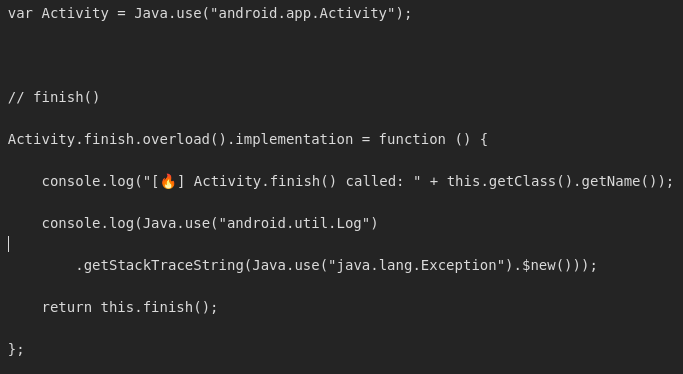
By using this script we observed something important that a flutter method channel is telling Android to close the app. As we patched the RootBeer earlier, this is confirmed that this method was being called by the native check (rjsniffer-lib).
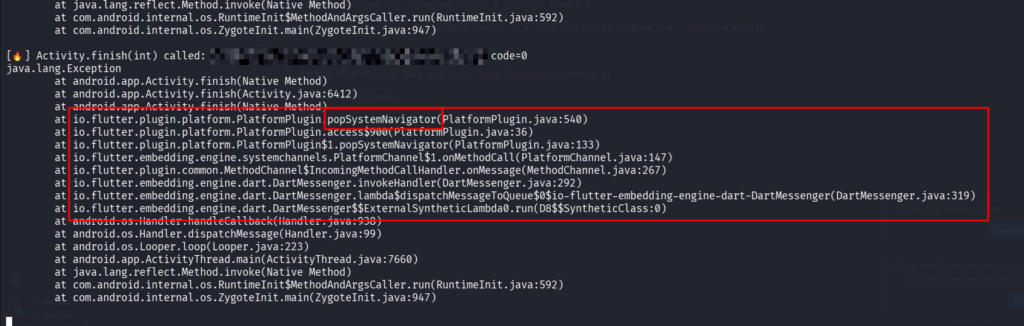
What Exactly is SystemNavigator.pop()?
SystemNavigator.pop() is a Flutter (Dart) API used to programmatically close an application. It belongs to Flutter’s services library and acts as a bridge between the Flutter (Dart) layer and the underlying operating system (Android/iOS) through platform channels.
In Flutter (Dart)
SystemNavigator.pop();It sends a message over Flutter’s platform channel and tells the OS: “close the application”
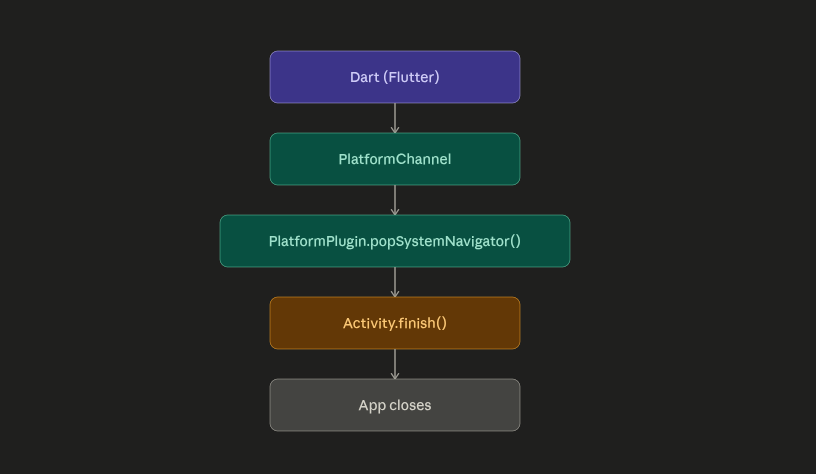
Why Developers Use This?
Instead of crashing the app:
System.exit(0); ❌they use:
SystemNavigator.pop(); ✔️Because:
- Cleaner exit
- Looks like user closed app
- Harder to detect as “security trigger”
Final Bypass: Hooking the Enforcement Point
Instead of chasing every detection mechanism, we targeted the final execution point.
Frida script used:
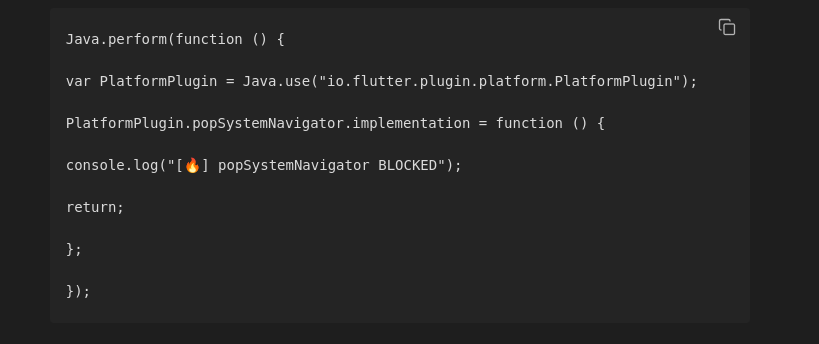
✅ Result
- App no longer exits
- Runs successfully on rooted device
- All detection logic becomes irrelevant because enforcement is blocked